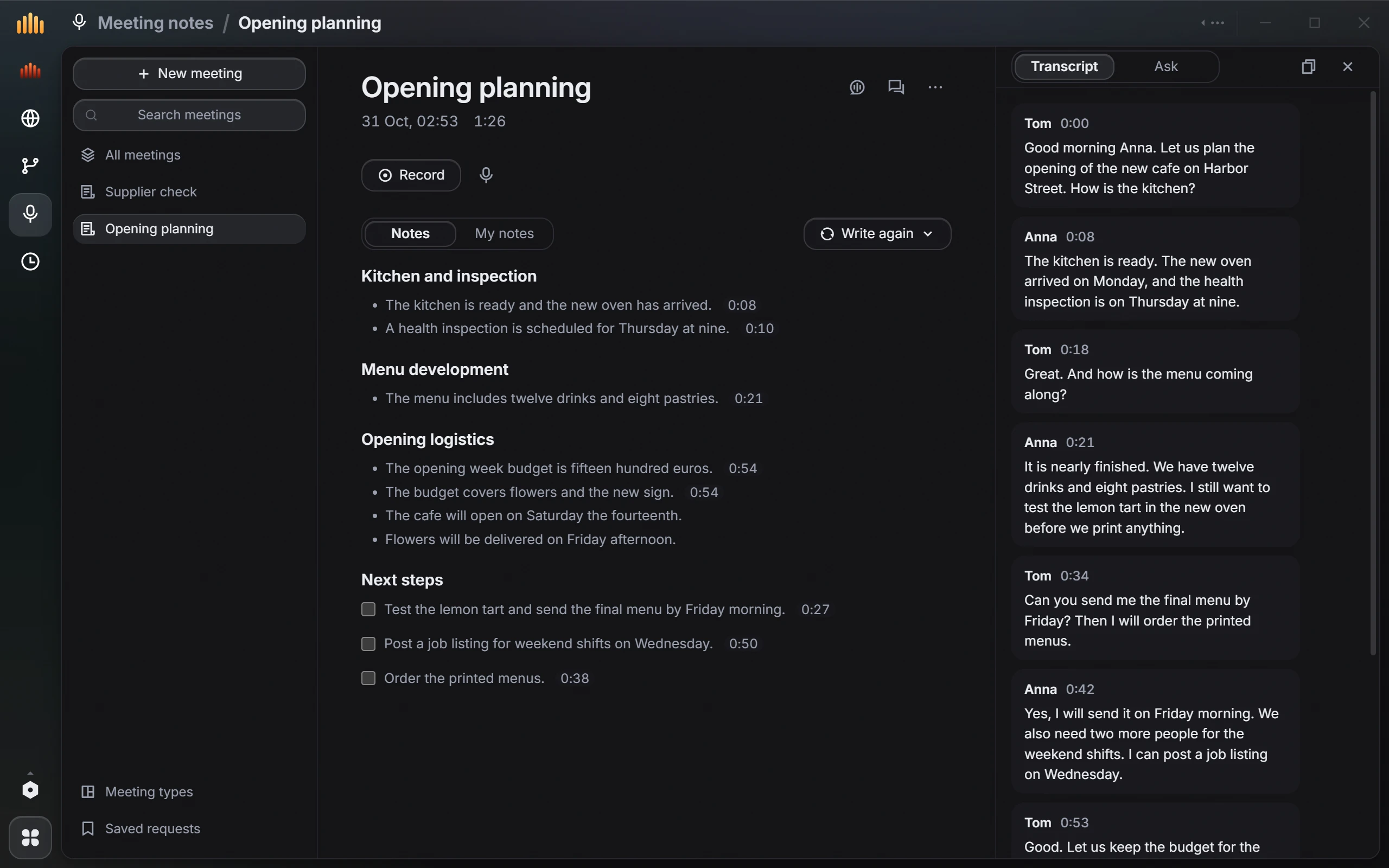
Turn every meeting into a transcript and clear notes. Pick the models Meeting notes listens and writes with, such as Nemotron 3.5 ASR to listen and Qwen3.8 27B to write.
An AI note taker without a bot.
Both sides of a call are heard through your microphone and the sound your device plays. Nothing joins the meeting, so any call program works, and so does a meeting in a room. When a call program starts to use your microphone, you are asked whether to take notes.
Your first notes in three steps.
1
Get Hearthscale.
Hearthscale is free for Windows 10 and 11 and for Linux, with no account. Hearthscale Server, which installs with it, runs the models.
2
Add Meeting notes.
Install Meeting notes from the Marketplace. The introduction offers a transcription model and a chat model recommended for your device: download both.
3
Record a meeting.
Open Meeting notes from the rail and choose Record. Choose Stop when the meeting ends, and your notes appear.
Write short points under My notes while people speak, then choose Stop. Your points and the transcript become notes under the sections of a meeting type, such as a one-on-one or a sales call. Your own words stay as you wrote them, and the time after each added line opens that moment of the transcript.
A live transcript, with names.
Every line shows as people speak, with who said it and when. Name a speaker once, and every line of theirs takes the name. Telling the voices apart needs a speaker model, called a diarization model, which is optional.
Ask about one meeting, or all of them.
Ask answers questions about one meeting, or about every meeting from the start page. Save the requests you make often, such as a follow-up mail or the next steps, and type / to use one. Search finds meetings by their title, notes or transcript.
Transcribe a meeting recording.
Have a recording already? Choose Transcribe a recording and pick the sound file. It becomes a meeting like any other, with a transcript and notes.
Local, offline meeting transcription.
With the transcription and chat models on your device, the transcript and the notes need no internet connection. The sound is not kept: each meeting is a folder of text files (Markdown) on your device. Nothing leaves it unless you choose a cloud model.
How Meeting notes compares.
From each maker’s own pages, checked on 16 November 2026. Otter, Granola and Fireflies also run on Mac and phones, and let a team share notes.
Turn a recording, an interview or a voice memo into text on your own device, with Whisper or Parakeet. Free and offline, with no minute limit and no account, on Windows and Linux.
FAQ
Frequently asked questions about AI meeting notes.
Does a bot join my meeting?
No. Nothing joins the call, so the other people see no bot and no extra participant. Your own device records the meeting.
Does it work with Zoom, Microsoft Teams and Google Meet?
Yes, and with any other call program, in a browser or as an app. The sound is taken from your own device, not from the call service.
Do I need consent to record a meeting?
Always ask. Tell everyone that you take notes from a recording, and get their consent before you choose Record. Because no bot joins the call, the other people see no sign of the recording. The rules on recording differ from country to country.
Can I use it for meetings with patients or clients?
With the models on your device, the sound, the transcript and the notes stay on it, and the sound is not kept. With a model on another of your devices, what that model needs goes there over an encrypted connection. With a cloud model, it goes to the provider. Usage data never contains your conversations or files, and you can turn it off in Settings → Privacy.
Is there a free AI note taker with no limits?
Meeting notes is free and needs no account. There are no minutes to count and no cap on meetings, because the work happens on your own device.
Which languages can it transcribe?
Those of the transcription model you choose. In Settings → Apps → Meeting notes, choose your languages under Models, then a model for them. Hearthscale’s own menus are in English.
What do I need to run it?
Windows 10 or 11, or Linux, on a 64-bit device. The introduction offers the models recommended for your device. Notes from a chat model under about 4 billion parameters, a measure of a model’s size, often repeat the transcript, so choose a larger one if your device can run it.
Is there a version for Mac?
Not yet. Hearthscale and Meeting notes run on Windows 10 and 11 and on Linux.